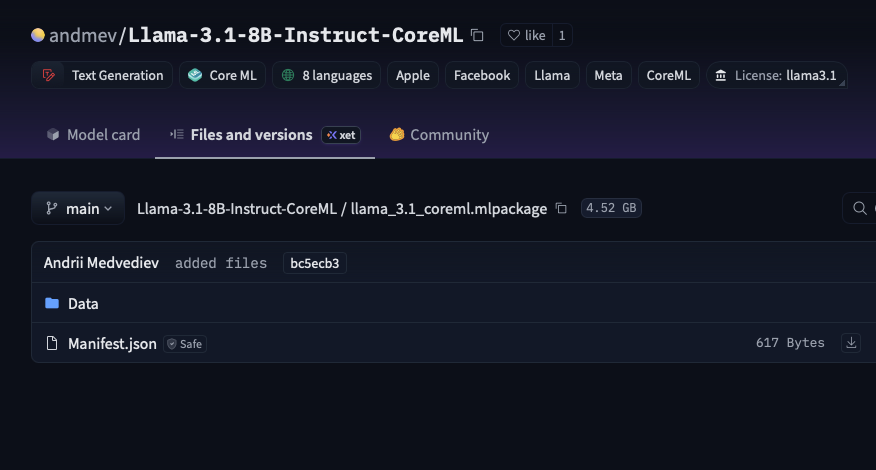
Each file can be downloaded from the Hub’s GUI, but if you want to download the entire collection, you’ll need to use a program other than a browser. Using HF CLI is often the fastest and easiest way to download.
Here is a step-by-step way to get the Llama-3.1-8B-Instruct-CoreML model as a CoreML .mlpackage, with context on what you are seeing on the Hugging Face page.
0. What’s going on with the Hugging Face UI?
On the model’s “Files and versions” page, the CoreML model appears as a folder named:
llama_3.1_coreml.mlpackage
Inside it you see only:
Data/Manifest.json(Hugging Face)
This is expected. A CoreML .mlpackage is not a single flat file; it is a directory bundle that usually contains a Manifest.json and data files (for example Data/com.apple.CoreML/...) rather than one .mlmodel file. (GitHub)
The web UI can download small individual files, but it does not provide a one-click “download this whole directory as a zip” button. Instead, you’re supposed to pull the repository (including that .mlpackage directory) with the Hub tools.
So nothing is missing and your access is fine; you just need to download via Python/CLI or git.
1. Prerequisites (once)
-
Make sure your Hugging Face account has accepted the Llama 3.x terms and been approved (you already mentioned it is). Meta’s Llama 3 models are a gated license, so a token with access is required. (Hugging Face)
-
Install the Hugging Face Hub tools:
pip install --upgrade huggingface_hub -
Log in from the terminal so the tools can use your token:
huggingface-cli login
# paste your HF token when asked
The same token will be used automatically by both the CLI and the Python API. (Hugging Face)
After that, you can choose one of the methods below.
2. Method A (recommended): Python snapshot_download
This downloads the entire repository, including the CoreML package, into a normal directory on disk.
-
Create a directory where you want the model:
mkdir -p ~/models cd ~/models -
Run this short Python script:
from huggingface_hub import snapshot_download model_path = snapshot_download( repo_id="andmev/Llama-3.1-8B-Instruct-CoreML", repo_type="model", # explicit but optional for models local_dir="Llama-3.1-8B-CoreML", local_dir_use_symlinks=False # get real files, not symlinks ) print("Downloaded to:", model_path)snapshot_downloadis the standard way to get all files from a Hub repo in one call. (Hugging Face)local_dir="Llama-3.1-8B-CoreML"tells it to put everything into./Llama-3.1-8B-CoreMLinstead of only the cache. (Hugging Face)local_dir_use_symlinks=Falseavoids symlinks and gives you a plain copy of the files, which tends to play better with CoreML tooling and with moving the folder around. (Hugging Face)
-
After it finishes, you will have:
~/models/Llama-3.1-8B-CoreML/
    llama_3.1_coreml.mlpackage/
        Data/
        Manifest.json
    README.md
    .gitattributes
    ...
On macOS,
llama_3.1_coreml.mlpackagewill look like a single “model file” in Finder, even though it is really a folder. This is exactly what you can drop into an Xcode project or use with CoreML tools. (Hugging Face)
3. Method B: Command-line only with huggingface-cli download
If you prefer not to write Python, the CLI can download the whole repo as well. The command uses the same underlying mechanism as snapshot_download. (Hugging Face)
-
Ensure you are logged in:
huggingface-cli login -
Download the full repository into a local directory:
huggingface-cli download \
    andmev/Llama-3.1-8B-Instruct-CoreML \
    --repo-type model \
    --local-dir ./Llama-3.1-8B-CoreML \
    --resume-download
Notes:
--repo-type modelmatches this repo’s type. (Hugging Face)--local-dirmakes it mirror the repo structure into that folder instead of only using the cache. (Hugging Face)--resume-downloadlets you rerun the command to continue a partial download.
-
After it completes, you’ll again see:
Llama-3.1-8B-CoreML/
    llama_3.1_coreml.mlpackage/
        Data/
        Manifest.json
    ...
That .mlpackage is the CoreML model bundle you want.
4. Method C: git clone (Git LFS/Xet)
You can also clone the repo using git. This is closer to how you’d pull source code, but for very large models it’s sometimes heavier than snapshot_download. Still, it works and many people use it.
-
Install git and Git LFS (example for macOS with Homebrew):
brew install git git-lfs git lfs install -
Clone the model repository:
git clone https://huggingface.co/andmev/Llama-3.1-8B-Instruct-CoreMLIf you hit auth errors, include username + token in the URL:
git clone https://YOUR_USERNAME:[email protected]/andmev/Llama-3.1-8B-Instruct-CoreMLThe Hugging Face model repos for big artifacts use LFS/Xet under the hood, but cloning will still give you the actual
.mlpackagedirectory. (Hugging Face) -
The cloned tree will contain the same
llama_3.1_coreml.mlpackage/as above.
5. How to verify you really have the CoreML model
Once any of the methods finishes, check:
-
There is a directory named
llama_3.1_coreml.mlpackage. -
Inside you see at least:
Manifest.json- A
Data/directory, often withcom.apple.CoreML/...and weights files. (GitHub)
-
On macOS, Finder treats
*.mlpackageas a single bundle; you may need to right-click > “Show Package Contents” to see the internal files.
If those three are true, you have the full CoreML package for Llama-3.1-8B-Instruct.
Quick recap
-
The Hugging Face web page shows the inside of a CoreML
.mlpackagefolder, not a single downloadable file. That’s why there is no big “Download” button. -
Use one of the Hub tools to get the whole repository:
-
Python:
snapshot_download( "andmev/Llama-3.1-8B-Instruct-CoreML", repo_type="model", local_dir="Llama-3.1-8B-CoreML", local_dir_use_symlinks=False, ) -
Or terminal:
huggingface-cli download andmev/Llama-3.1-8B-Instruct-CoreML \ --repo-type model --local-dir ./Llama-3.1-8B-CoreML -
Or
git cloneif you prefer git.
-
-
After download, the
.mlpackagebundle lives at:Llama-3.1-8B-CoreML/llama_3.1_coreml.mlpackage/
and can be used directly with CoreML / Xcode.
This topic was automatically closed 12 hours after the last reply. New replies are no longer allowed.